AR Aging Automation & Workflow Control Framework
Role
Consultant
Industry
Excel, Power Query, VBA, NetSuite
Scope
Finance Systems Optimization | Process Automation | Controls & Data Architecture
Overview
Accounts Receivable aging data was available in NetSuite and refreshed hourly, but the operational workflow built on top of it relied heavily on manual Excel manipulation. Analysts downloaded the aging report and manually categorized accounts, inserted comments, created subtotal sections, and allocated balances into category-specific columns.
This process introduced several structural problems:
repeated manual classification on a report that refreshes hourly
mixing transactional data, workflow status, and reporting layout in one sheet
fragile spreadsheet structure dependent on manual formatting
risk of misclassification or allocation errors
limited scalability as transaction volume increased
The goal of this project was to redesign the workflow into a structured, automated reporting framework while preserving the operational flexibility analysts needed.
Problem
The existing process had five structural weaknesses.
1. Manual status classification
Each row required manual assignment into operational categories such as:
Contract Talk
Payment Plan
Early Termination
Collection Agency
Terminated
Promised to Pay
These statuses were typed directly into the working spreadsheet and needed to be re-applied as data refreshed.
2. Data and presentation were intertwined
The report used a format optimized for human readability:
category header rows
blank spacing between sections
manually inserted subtotals
amounts copied into category columns
Because of this layout:
the data was not a flat table
formulas were fragile
automation tools such as Power Query or pivots could not reliably process the dataset.
3. Workflow metadata was not persistent
Statuses and comments were embedded in the working spreadsheet rather than stored separately.
Every refresh introduced risk that:
classifications would be lost
comments would be overwritten
analysts would need to reapply tags.
4. Manual allocation logic
Amounts over certain aging thresholds were manually moved into category columns such as “Collection Agency”.
This introduced control risks including:
misallocation of balances
inconsistent classification logic
subtotal errors.
5. Limited scalability
Because the report refreshed hourly, analysts repeatedly performed the same steps:
download report
restructure sheet
apply status classification
recalculate totals
This created unnecessary operational friction and prevented real-time monitoring of receivable risk.
Solution
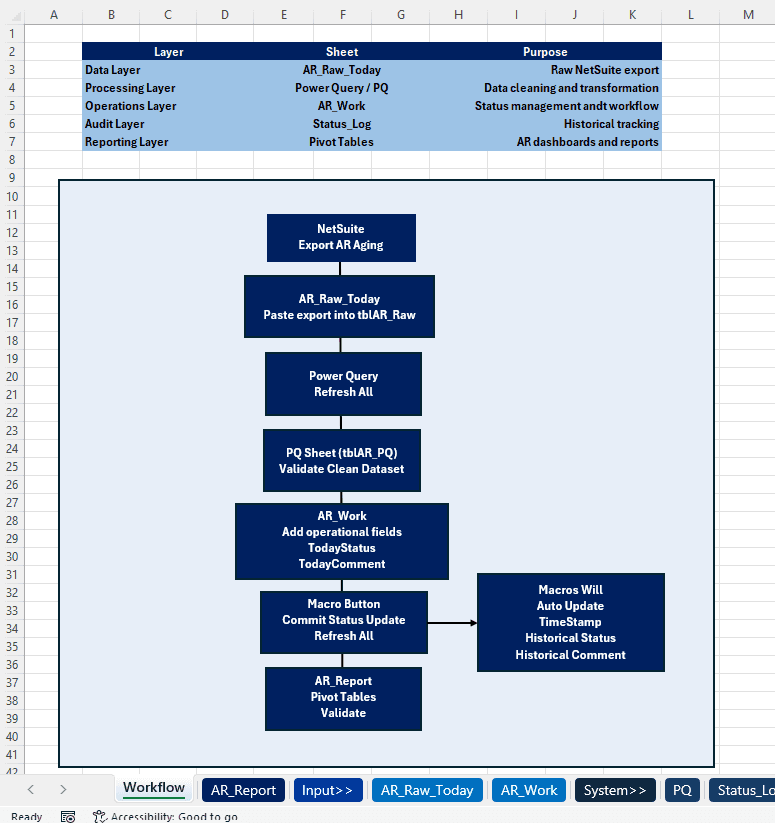
The solution redesigned the workflow into a four-layer architecture separating data, control logic, and reporting.
Layer 1 — Raw Data (Source Layer)
A NetSuite aging export is loaded into Excel as a structured table (tblAR_Raw).
Power Query transforms the dataset into a clean analytical table by:
normalizing inconsistent column names
extracting HotelID identifiers from NetSuite project fields
standardizing aging bucket columns
computing derived metrics such as Over60days balances
This creates a stable, machine-readable dataset independent of manual formatting.
Layer 2 — Workflow Control Layer
Operational classifications are entered in a structured input area within the workbook:
TodayStatus
TodayComment
A VBA macro commits updates into a persistent log table (tblLog) containing:
timestamp
hotel ID
status classification
analyst comment
user identifier
This design separates workflow metadata from the transactional dataset and creates a historical record of account status changes.
Layer 3 — Automation Layer
The automation layer ensures that manual effort is minimized while preserving data integrity.
Key features include:
validation of allowed status categories
duplicate-entry protection to prevent repeated commits
automated clearing of processed inputs
automatic pivot refresh after updates
Power Query also dynamically stabilizes NetSuite’s aging bucket columns, which often contain changing labels tied to date ranges.
Layer 4 — Reporting Layer
Aging balances are analyzed using pivot tables and calculated metrics rather than manual subtotals.
Examples include:
balances over 60 days by operational status
receivables under collection agency review
accounts with active payment plans
termination-related receivables
Because the dataset is now fully structured, reports refresh automatically as new data arrives.
Results
The redesigned workflow delivered several improvements:
Manual effort reduction
eliminated repeated report restructuring and subtotal creation
automated aging calculations and category allocation
Improved data integrity
enforced consistent status classifications
created an auditable log of account status changes
Automation readiness
transformed a manually formatted spreadsheet into a machine-readable dataset
enabled scalable reporting through Power Query and pivots
Operational visibility
provided a clearer real-time view of receivable exposure by collection status
reduced dependency on ad-hoc spreadsheet manipulation.
Key Technical Concepts Demonstrated
This project demonstrates several finance systems capabilities:
designing structured data pipelines in Excel using Power Query
building VBA automation for workflow logging and validation
stabilizing inconsistent ERP exports for reporting use
separating transactional data from operational metadata
implementing lightweight internal controls within Excel-based processes.
What I Learned
The core insight from this project was that the inefficiency did not come from the AR report itself, but from the way multiple functions were being handled inside a single spreadsheet.
Transactional data, workflow classification, escalation tracking, and reporting were all embedded in one manually structured file.
By separating these components into structured layers, the workflow became significantly more scalable and reliable without requiring a full systems implementation.
Other projects

Accrual Intake & Close Process Automation
Redesigned a fragmented, spreadsheet-driven accrual submission process into a centralized, structured intake system to improve data consistency, reduce manual consolidation, and accelerate the month-end close cycle.
AR Aging Automation & Workflow Control Framework

Finance Systems Automation & Governance
Using Microsoft Power Automate to Strengthen Financial Controls and Scale Operations